

TracePro®
TracePro® the industry-leading optical design ray tracing software from Lambda Research Corporation offers a powerful suite of tools that integrate Monte Carlo ray tracing, advanced analysis capabilities, CAD import/export functionalities, an interactive sequence editor and sophisticated optimization methods. This comprehensive illumination and optical simulation and analysis software addresses a wide spectrum of challenges in optical analysis and illumination design, making it an indispensable tool for professionals across various industries. Learn how TracePro streamlines stray light analysis.
What our customers say:
"Thanks to the advanced ray-tracing capabilities and precision of TracePro, my scientific paper has successfully passed the peer-review process and has been officially published."
Kerem Can Yildirim
Author of Simulation-Based Analysis of the Effect of PCB Surface Color on Luminous Flux and Photometric Efficiency in LED Luminaires
"As we expected, TracePro turned out to be the only affordable tool for calculating the power distribution of light reflected from complex surfaces.When designing a UV disinfection system, it is important to correctly assess the radiation dose, taking into account the properties of the ambient surfaces. This is what allows you to destroy microorganisms and not bring collateral damage.TracePro software helped us to build solutions for specific applications by simulation of light power distribution in air ducts of complex shapes. The combination of Autodesk Fusion and TracePro brings fast and reliable results for our customized projects."
Evgeny Slivinskiy
R&D Manager, Respiray
"TracePro’s intuitive 3D user interface saves us time and money. TracePro allows us to quickly generate accurate optical simulations from our SOLIDWORKS and CREO CAD models. The 3D visual nature of TracePro allows us to easily verify our geometry. We routinely use TracePro for design and analysis of illumination systems including optical instruments, LED optics, light guides, tissue optics, LIDAR and UV Disinfection systems."
Fred Bushroe
President, INOV Inc.
TracePro Advantages
Solid Modeling
TracePro’s robust solid modeling engine ensures consistent and reliable models. Users can create models by importing lens designs or CAD files, or by directly creating geometry within the software’s intuitive 3D CAD interface. This flexibility allows for rapid prototyping and iteration of complex optical systems, streamlining the design process and reducing time-to-market for new products.
Performance & Accuracy
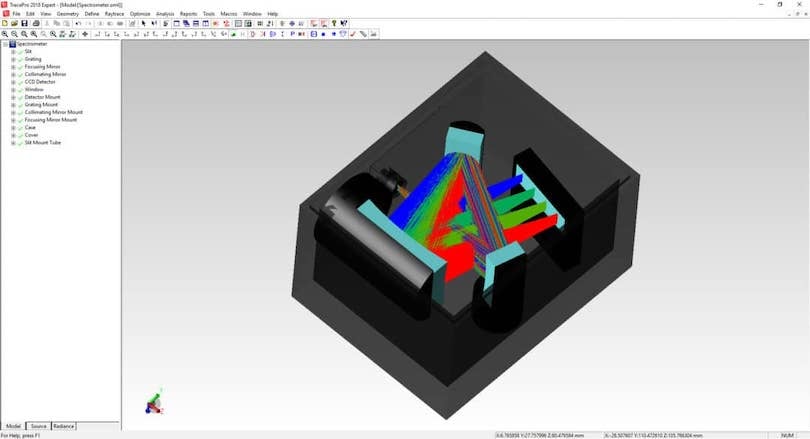
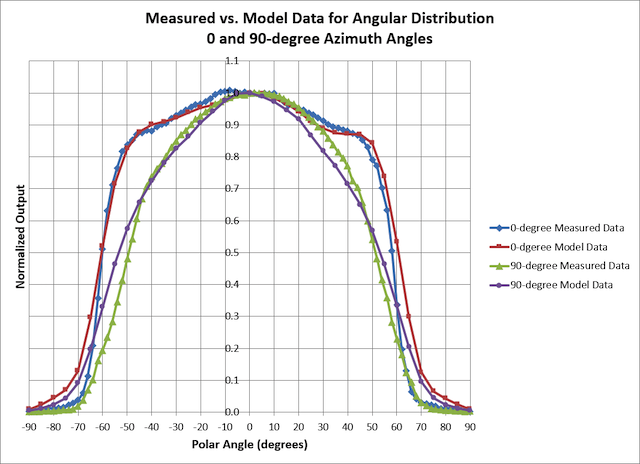
TracePro’s ray tracing engine excels in speed and accuracy. It performs exact ray tracing to all surfaces, including imported splines, without missed intersections or "leaky" rays.
The software’s unique Analysis Mode creates an interactive environment where users can visually and quantitatively assess every surface and object within their design, providing unprecedented insight into system performance.
Predefined Optical Properties
Extensive Database
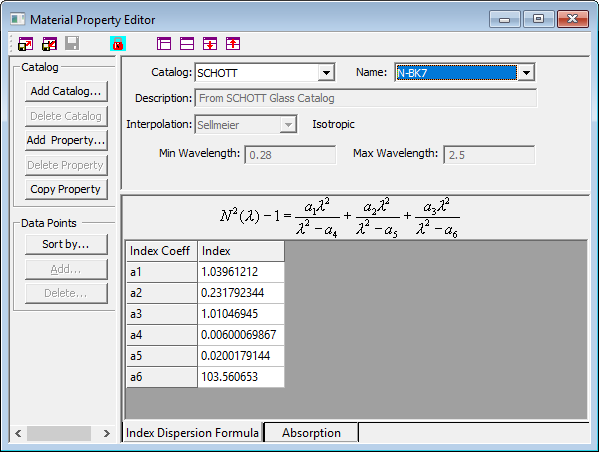
TracePro comes equipped with an extensive library of predefined optical properties, including materials (optical glass, plastics, infrared materials), surface properties, bulk scatter characteristics, and fluorescence data.
This comprehensive database significantly reduces time required for material selection and property assignment, allowing designers to focus on innovation rather than data entry.
Customizable Properties
Users can add their own properties to the database, tailoring it to specific needs and streamlining the modeling process.
This feature is particularly valuable for organizations working with proprietary materials or unique optical configurations.
User-Friendly Design
The software’s user interface is designed to be user-friendly, offering a familiar CAD-like experience that minimizes learning curves and eliminates the need for extensive retraining.
This intuitive interface, coupled with powerful functionality, makes TracePro accessible to both novice users and experienced optical engineers.
Intuitive User Interface
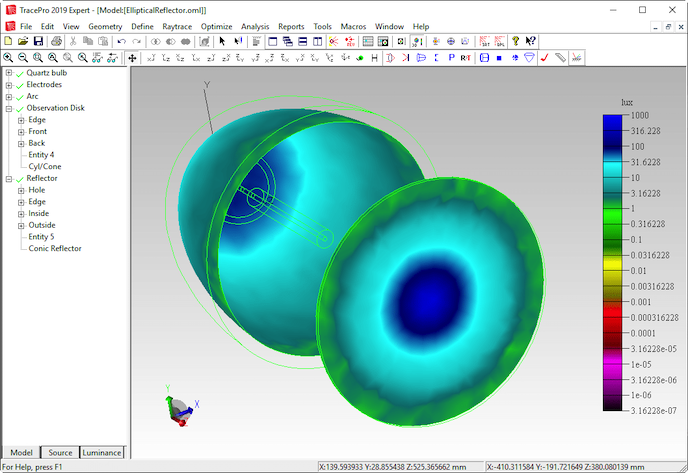
TracePro sets itself apart from other software solutions with its friendly and quickly learned CAD-like interface.
TracePro’s famously easy-to-use GUI means a short learning curve and no re-training.
Spectroscopy Analysis
TracePro’s Spectroscopy Analysis provides an advanced capability to evaluate optical system performance across different wavelengths. This feature enables users to conduct precise wavelength-dependent simulations, ensuring accurate spectral response for applications such as lighting, biomedical optics, display technology, and remote sensing.
Wavelength-Specific Optical Analysis
This capability allows for precise wavelength-dependent optical simulations, ensuring reliable system performance across diverse applications.
Material and Coating Spectral Properties
Analyze the transmission, reflection, and absorption characteristics of optical components at various wavelengths. This helps in selecting the best materials and coatings to enhance system efficiency and reduce optical losses.
Custom Spectral Data Integration
Easily import custom spectral response data or use TracePro’s extensive built-in database for precise material and system modeling. This flexibility streamlines the design process and enhances accuracy.
"Need to optimize lenses and imaging system for metrics such as MTF and other aberrations? Check out OSLO."
Dave Jacobsen
Director of Sales and Application EngineeringTitle
What Does TracePro Do?



TracePro’s Customization
Choice of Ray Tracing Modes
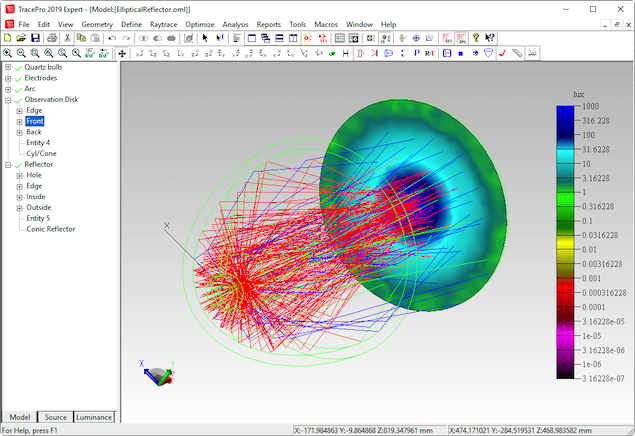
Analysis Mode: Ideal for tracing moderate numbers of rays (hundreds to thousands) with the ability to interactively analyze results on any surface.
Simulation Mode: Designed for tracing vast numbers of rays (millions, billions, or even trillions) to achieve highly accurate simulations of complex optical systems.
Source, Material, Fluorescence, and Surface Property Database
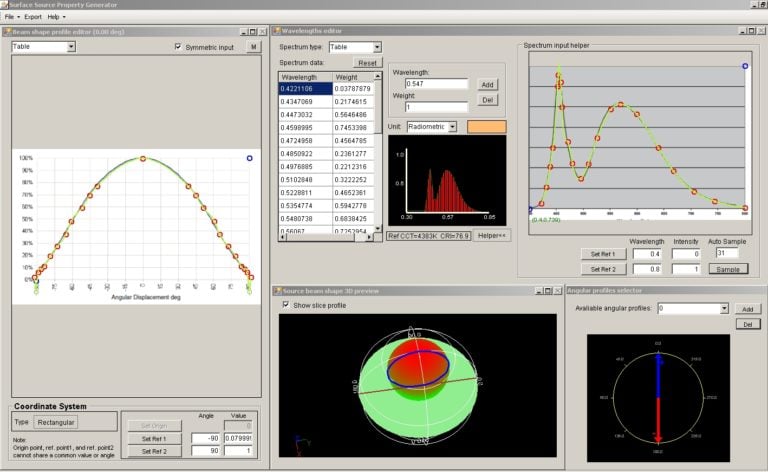
Properties can be defined with customized parameters or applied from TracePro’s catalog of commonly used, commercially-available sources, materials and coatings.
You can also add your own properties to the database to streamline the modeling process.
Versatile Programmability
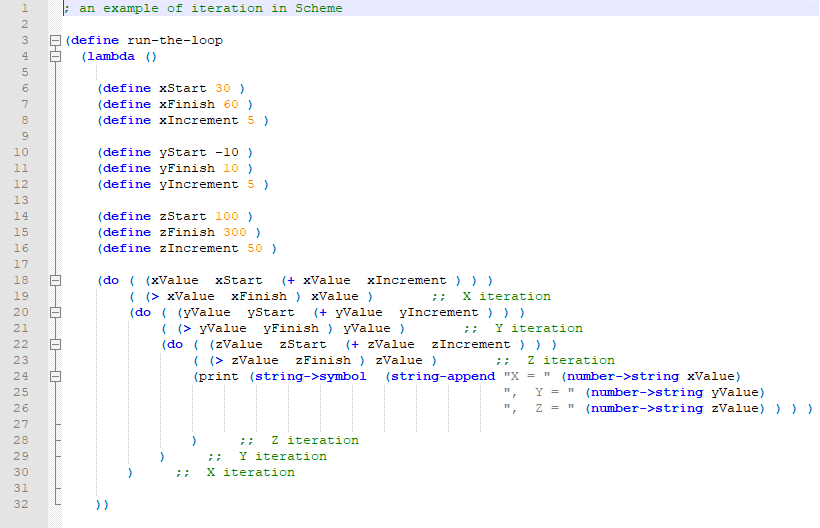
TracePro’s powerful macro language enables you to automate many analysis and design tasks. The Macro Recorder is a great tool for learning the Scheme programming language, and for jump-starting your programming task. Most functions that are available in the TracePro user interface are also available as macro commands.
You also have access to the underlying solid modeling engine for low-level access to geometry creation, editing, and analysis. Scheme is a full-featured programming language, offering looping, branching, file I/O, and more.

Illumination Design
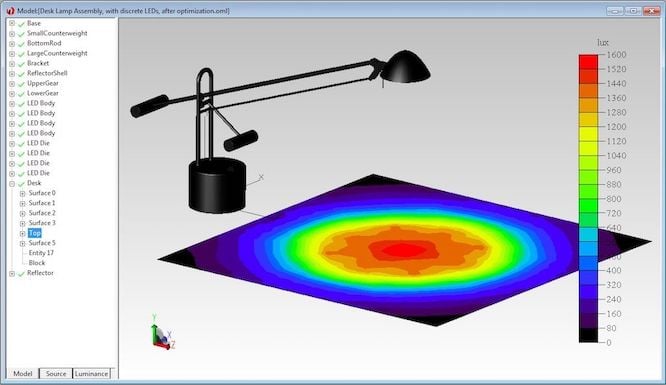
TracePro offers the most accurate and comprehensive design environment for luminaire and illumination designers.
It addresses critical performance criteria, including spatial and angular light distributions, uniformity, luminance, and spectral characteristics, while also considering aesthetic factors.
Interactive Optimizer
Our intuitive and easy-to-learn interface empowers
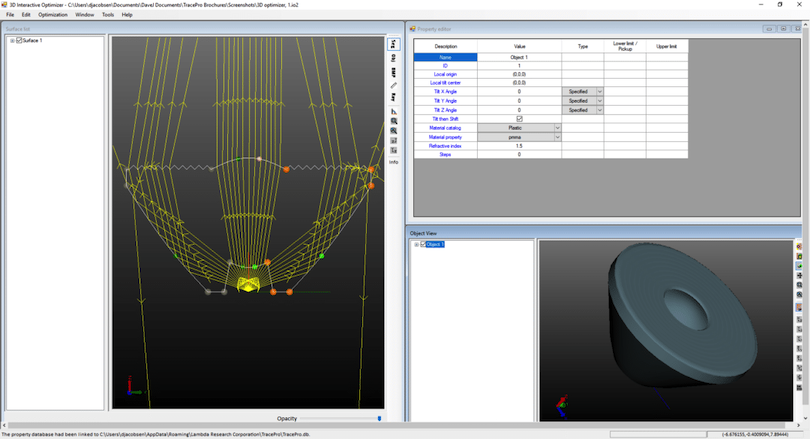
The software’s interactive optimizer empowers users to sketch initial designs with interactive ray-trace capabilities and then optimize using a wide range of operands.
Combined with photorealistic rendering, this feature enables rapid and efficient design iteration, often reducing the need for costly prototypes.
RepTile™
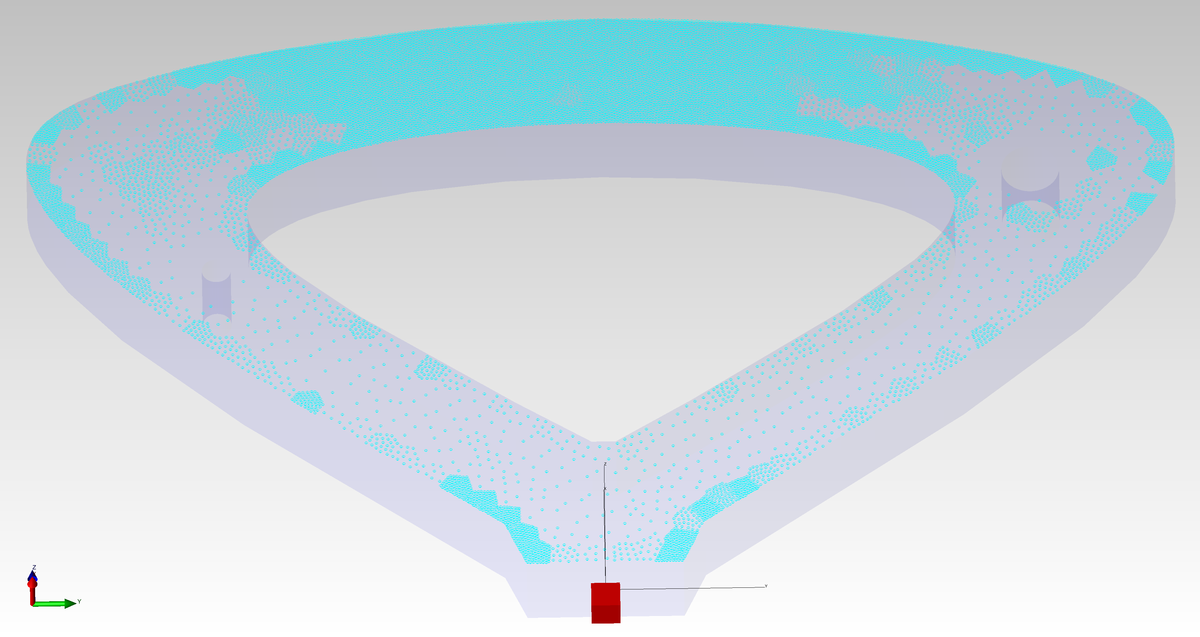
The RepTile (Repetitive Tile) feature enables procedural modeling of repeated microstructures that are used for diffusers on display backlights. These diffusers are too complex for explicit modeling in CAD software, but can be ray-traced efficiently in TracePro Expert, and optimized using the Texture Optimizer.
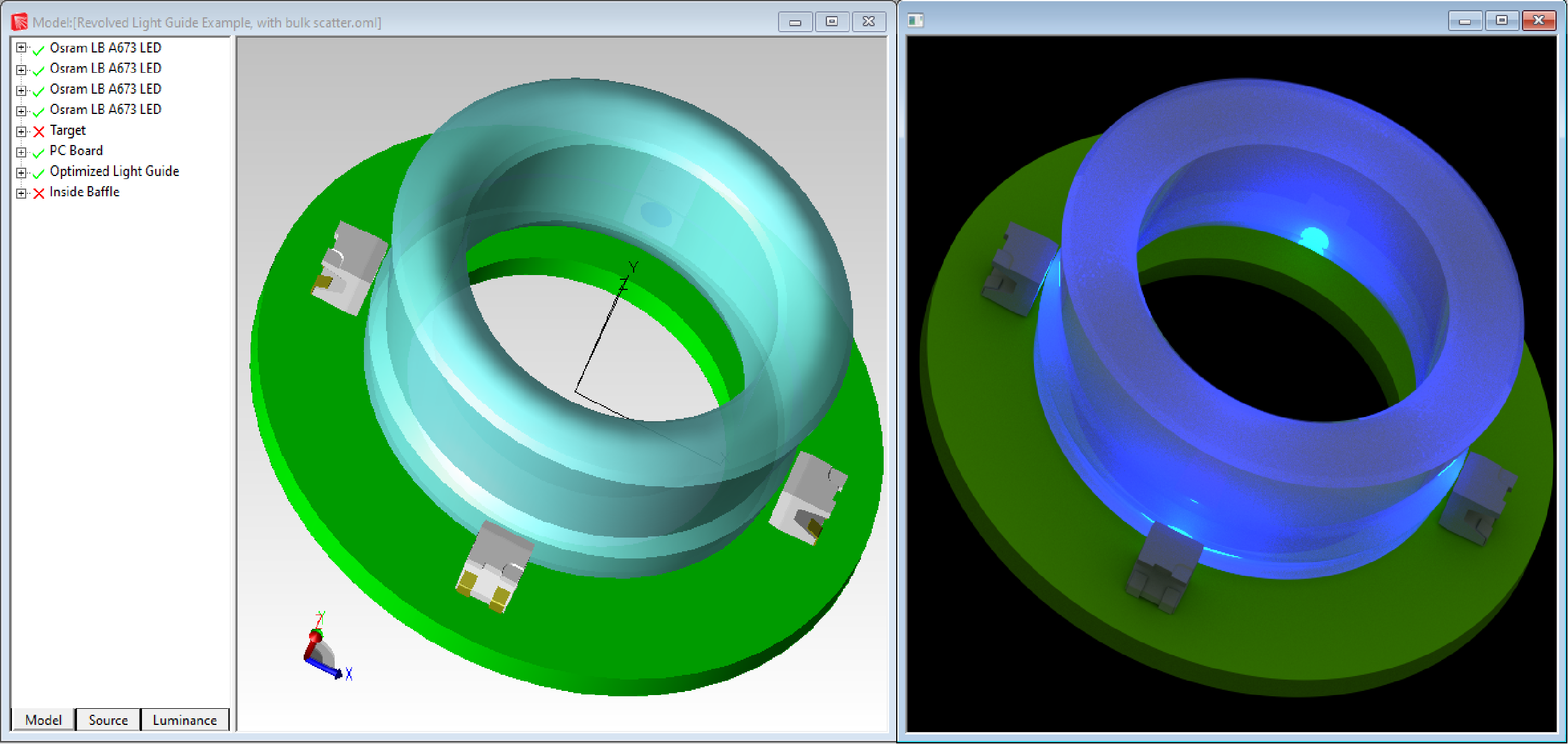
Photorealistic Rendering
Accurately simulate the lit appearance of your product, and reduce costly trial-and-error prototyping.
Whether you are designing an instrument panel, light pipes for switches or indicators, or automotive lighting, TracePro can accurately model the appearance of your design.

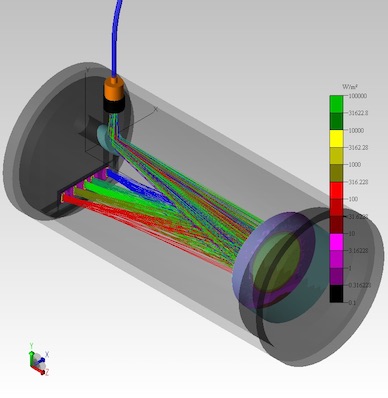
Imaging Optics
TracePro is used to analyze non-imaging aspects of imaging systems, such as stray light, polarization effects, thermal loading, bulk scatter, and fluorescence.
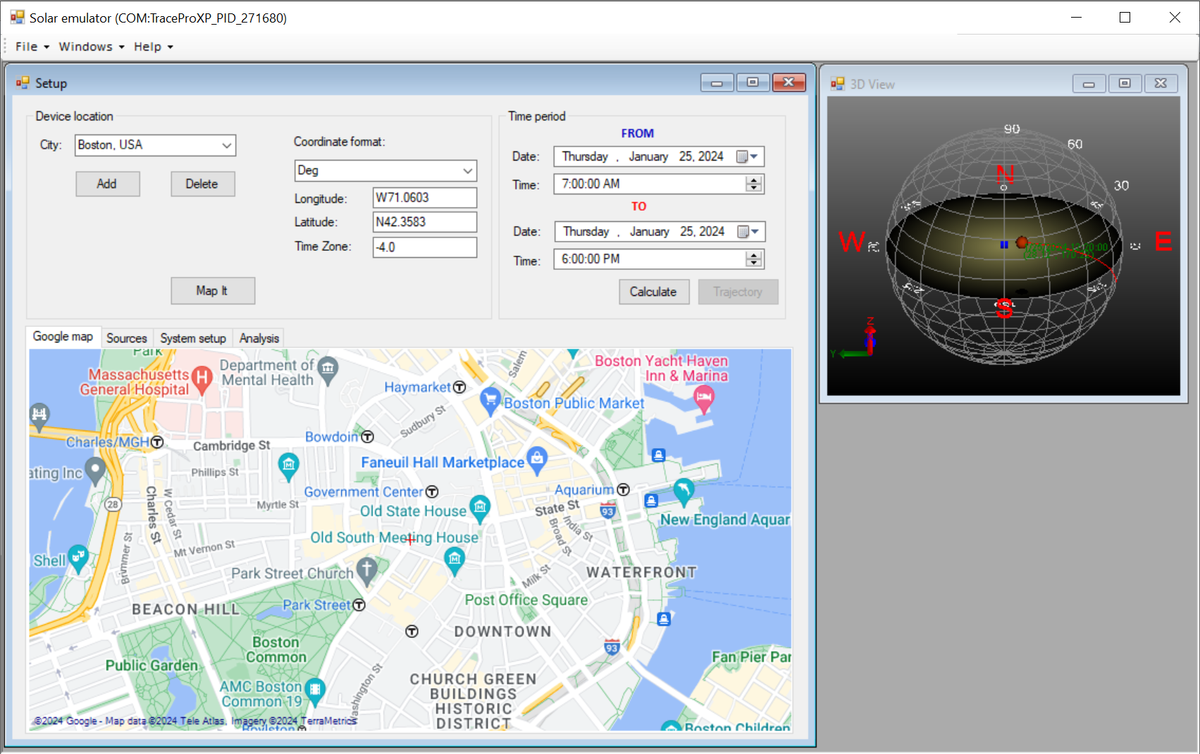
Solar Emulator
TracePro’s Solar Emulator ensures solar collectors operate at peak efficiency. It allows for analysis of solar designs over specified sun travel periods, considering multiaxial tracking and irradiance for both direct and indirect sun contributions.
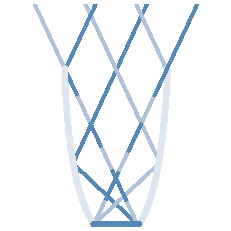
Non-imaging Optics
Light guide and display designers can be confident that TracePro will accurately predict the performance and aesthetics of finished products with fewer costly prototypes. TracePro offers equipment and industrial designers the confidence that the simulation will accurately predict performance without costly prototype iterations for a wide variety of technologies.
Stray Light Analysis
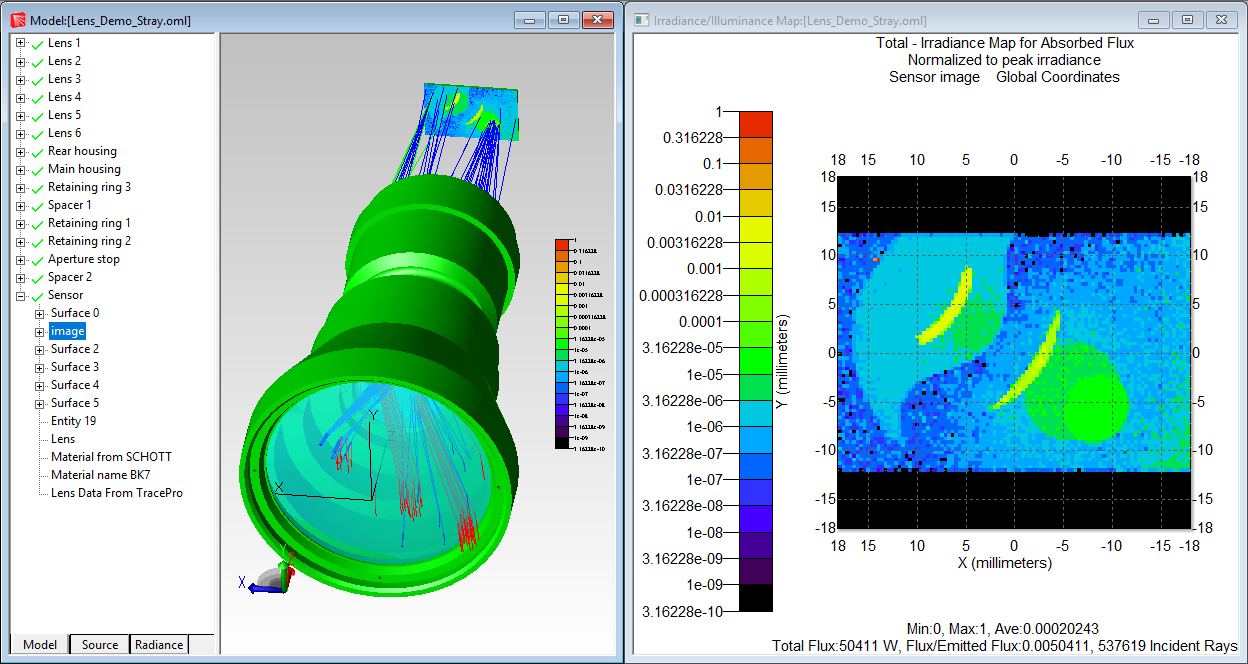
Originally developed for NASA to address stray light analysis for space telescopes and remote sensing systems, TracePro continues to excel in this area. Its advanced path sorting, ray visualization, and optimization tools make it possible to create highly efficient optical systems with minimal unwanted light interference.
Sequence Editor
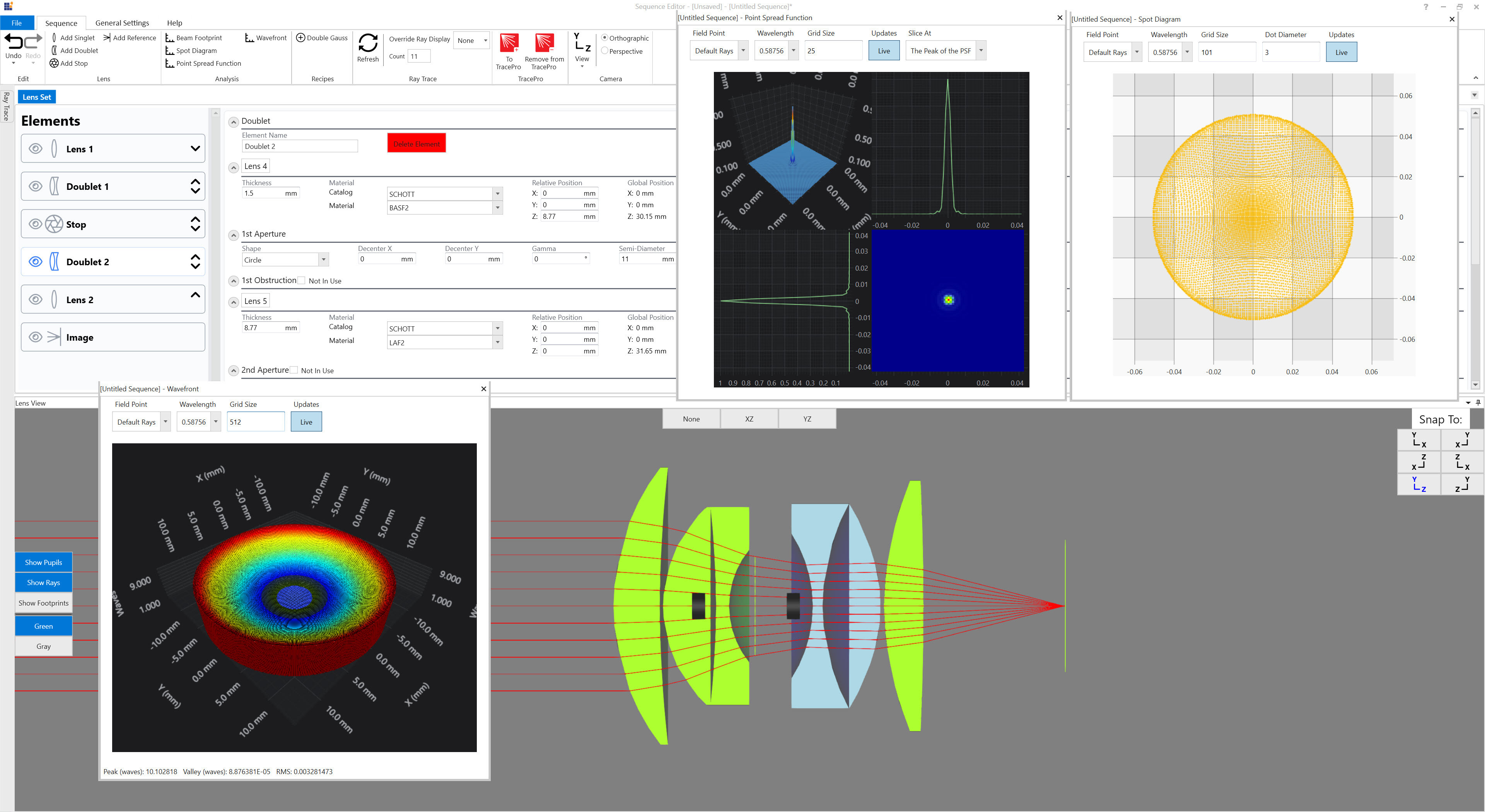
Introducing the new Sequence Editor for TracePro 2024. The Sequence Editor expands the already industry leading capabilities of TracePro. Thisbrings sequential ray tracing and optical analysis tools similar to OSLO into TracePro. Sequential ray tracing is an important part of lens and imaging system design. Available analysis tools include Spot Diagrams, Point Spread Function, and Beam Footprints. Additional analysis tools will be added soon. The Sequence Editor is able to transfer models to TracePro seamlessly for additional analysis, such as a stray light analysis or a display visualization analysis. The Sequence Editor will be included in the Standard and Expert editions of TracePro.
Tracepro Applications
Light Pipe Design
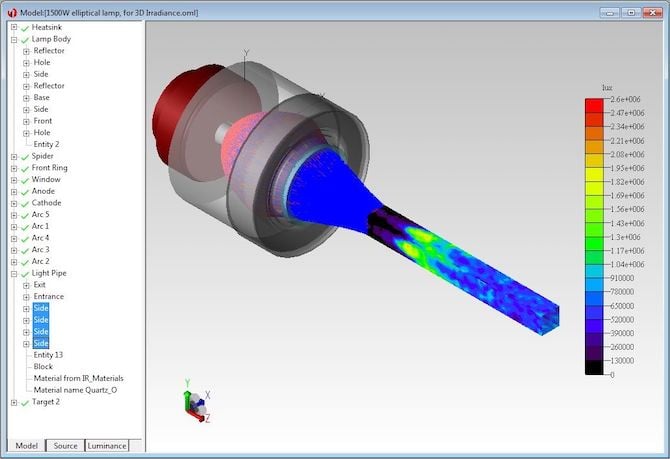
Light pipes or light guides are commonly used in consumer electronics, avionics, instrument panels, switches, indicators, and display devices. Light pipes are clear, polished plastic devices molded as a single piece, and are used to guide light to where it is needed.
Stray Light
Due to its generality, TracePro has been used to simulate optical systems operating at wavelengths ranging from the extreme ultraviolet, through the visible and infrared, to millimeter wavelengths. The intuitive user interface and accurate CAD file import …
Display Design
TracePro is used by the world’s top display manufacturers for display design. Modern display backlights must meet specifications for spatial and angular uniformity, brightness, and spectral characteristics. Quickly achieving these criteria with a …
More Information
- Data Sheets
- Computer Requirements
- Literature
- Tutorials
Backlit Display Design Using TracePro
Biomedical Applications Using TracePro
Designing LED Optical Components
Luminaire Design Using TracePro
Operating System |
Windows 11 (64-bit) Windows 10 (64-bit) |
Minimum RAM |
8 GB minimum, 16GB+ recommended |
Recommended Processor |
Recent 64-bit processor with as many cores as possible for best results and fastest raytracing |
Recommended Graphics Card |
Dedicated graphics card, mid-range or high performance, suitable for CAD programs |
Recommended Storage |
Solid State Drives improve TracePro performance in instances where TracePro is reading/writing to the hard drive |
The journal articles and proceedings papers shown below were written by TracePro users or by Lambda Research staff. Those published by SPIE are available through the SPIE Digital Library. Many more papers describing TracePro applications can be found by searching for TracePro on Google Scholar.
Modular LED arrays for large area solar simulation
Alaa Y. Al‐Ahmad, John Holdsworth, Ben Vaughan, Galiya Sharafutdinova, Xiaojing Zhou, Warwick J. Belcher, Paul C. Dastoor
Prog Photovolt Res Appl. 2018;1–11. doi: 10.1002/pip.3072
Published by Wiley
Analytical method to measure bending deformations in prismatic optical films
Berta García-Fernández, Antonio Álvarez Fernández-Balbuena, Daniel Vázquez-Moliní, University Complutense of Madrid, Spain
Published by Chinese Optics Letters 14(4), 042201(2016)
Design and characterization of refractive secondary optical elements for a point-focus Fresnel lens-based high CPV system
Juan P. Ferrer-Rodríguez, Hasan Baig, Alberto Riverola, Eduardo F. Fernández, Daniel Chemisana, Florencia
Almonacid, Tapas K. Mallick, and Pedro Pérez-Higueras
AIP Conference Proceedings 1881, 030003 (2017); doi: 10.1063/1.5001414
Published by the American Institute of Physics
Maximum Exposure: Ray-Tracing Software Optimizes Reflector Design
Photonics Spectra, October 2016
Michael Gauvin
Lambda Research Corporation, 515 Groton Road, Westford MA 01886
New Wearable Designs with Pulse Oximetry Don’t Miss a Beat
EuroPhotonics Spectra, March 2016
Michael Gauvin
Lambda Research Corporation, 515 Groton Road, Westford MA 01886
Using Optical Simulation Tools to Design 3D Printers
Photonics & Imaging Technology, July 2016
Michael O’Keefe of Greenlight Optics, Loveland Ohio
Michael Gauvin of Lambda Research Corporation, 515 Groton Road, Westford MA 01886
Optical design of a 4-off-axis-unit Cassegrain ultra-high concentrator photovoltaics module with a central receiver
Otpics Letters, May 1, 2016
Juan P. Ferrer-Rodriguez, Eduardo F. Fernandez, Florencia Almonacid, and Pedro Perez-Higueras
IDEA Solar Research Group, Center for Advanced Studies in Energy and Environment (CEAEMA), Universida de Jaen, Jaen, Spain
General discussion of how nature and our bodies use Near Infrared as part of our natural defenses. Silas Tech’s CEO, Scott Zimmerman, introduces NIR enhanced lighting and displays. See the TracePro tissue model results for both dark and light skin discussed at the 13 minute mark.
Real-time pixel based early apple bruise detection using short wave infrared hyperspectral imaging in combination with calibration and glare correction technique
Janos Keresztes, Mohammed Goodarzi and Wooter Saeys
KU Leuven, Department of Biosystems, MeBioS, Kasteelpark Arenberg 30, 3001 Leuven, Belgium
Preliminary Optical, Thermal and Structural Design of a 100 kW CSPonD Beam-down On-sun Demonstration Plant
Benjamin Grange, Vikas Kumar, Antoni Gil, Peter R. Armstrong, Danel S. Codd, Alexander Slocum, Nicolas Calvet
Institute Center for Energy (iEnergy), Department of Mechanical and Materials Engineering, Masdar Institute of Science and Technology
Optical Design of a light-emitting diode lamp for a martime lighthouse
D. Jafrancesco, L. Mercatelli, P. Sansoni, D. Fontani, E. Sani, S. Coraggia, M. Meucci, and F. Francini
CNR-INO National Institute of Optics, Largo E. Fermi, 6—Firenze—50125, Italy
Line-conentrating Flux Analysis of 42kWe High-flux Solar Simulator
J. Li, J. Gonzalez-Aguilar, M. Romero
IMDEA Energía, Avda. Ramón de la Sagra 3, 28933-Móstoles, Spain
Optical Modeling of a Solar Dish Thermal Concentrator Based on Square Flat Facets
Sasa Pavlovic, Darko Vasiljevic and Velimir Stefanovic
Faculty of Mechanical Engineering University of Nis, Thermal Engineering Department, *Aleksandra Medvedeva 14, 18000 Niš, Serbia
Ray Tracing Study to Determine the Characteristics of the Solar Image in the Receiver for a Thermal Solar Concentration System
Sasa Pavlovic, Velimir Stefanovic, Predrag Rajkovic, Emina P. Petrovic, Sadoon Ayed
Faculty of Mechanical Engineering University of Nis, Thermal Engineering Department, *Aleksandra Medvedeva 14, 18000 Niš, Serbia
Optical Design of A Solar Parabolic Thermal Concentrator Based on Trapezoidal Reflective Panels
Sasa Pavlovic, Darko Vasiljevic and Velimir Stefanovic
Faculty of Mechanical Engineering University of Nis, Thermal Engineering Department, *Aleksandra Medvedeva 14, 18000 Niš, Serbia
Impact of the accurateness of bidirectional reflectance distribution function data on the intensity and luminance distributions of a light-emitting diode mixing chamber as obtained by simulations
Jan Audenaert, Frédéric B. Leloup, Bart Van Giel, Guy Durinck, Geert Deconinck,
and Peter Hanselaer
Optical Engineering, Volume 52, Issue 9 (2013)
Simulating the spatial luminance distribution of planar light sources by sampling of ray files
Jan Audenaert, Guy Durinck, Frédéric Bernard Leloup, Geert Deconinck, and Peter Hanselaer
Optics Express, Vol. 21, Issue 20, pp. 24099-24111 (2013)
Accurate LED Source Modeling using TracePro
David Jacobsen
Presentation given at Optatec 2012
Optical design in illumination system of digital light processing projector using laser and gradient-index lens
Dawei Rui, Zulun Lin, Kangcheng Qi, and Wenbin Chen
Opt. Eng. 51, 013004 (2012)
Analysis to stray radiation of infrared detecting system
Jin-xing Niu, Shuheng Shi, and Ren-kui Zhou
Proc. SPIE 8193, 81931H (2011)
Design and performance of a low-cost acrylic reflector for a ~7x concentrating photovoltaic module
Kara A. Shell, Scott A. Brown, Mark A. Schuetz, Robert J. Davis, and Roger H. French
Proc. SPIE 8108, 81080A (2011)
Lighting quality for aluminum and prismatic light guides
Berta García-Fernández, Daniel Vázquez-Molini, and Antonio Álvarez Fernández-Balbuena
Proc. SPIE 8170, 81700T (2011)
Mid-wave infrared dual-field-of-view lenses with high ratio for third generation thermal imager
Ronggang Li, Xingde Zhang, and Lin Liu
Proc. SPIE 8197, 819715 (2011)
Novel high-brightness backlight module for autostereoscopic liquid crystal display
Xiangbing Zhu, Qiaoyun Chen, Feng Jiang, and Han Wu
Opt. Eng. 50, 054001 (2011)
Optical design of color light-emitting diode ring light for machine
vision inspection
Jing-tao Dong, Rong-sheng Lu, Yan-qiong Shi, Rui-xue Xia, Qi Li, and Yan Xu
Opt. Eng. 50, 043001 (2011)
Smooth light extraction in lighting optical fibre
A. A. Fernandez-Balbuena, D. Vazquez-Molini, A. Garcia-Botella, J. C. Martinez-Anton, and E. Bernabeu
Proc. SPIE 8170, 81700S (2011)
Accurate source simulation in modern optical modeling and analysis software
David A. Jacobsen, Edward R. Freniere, and Michael Gauvin
P roc. SPIE 7597, 75971E (2010)
An update on the role of systems modeling in the design and verification of the James Webb Space Telescope
Danniella M. Muheim et al.,
Proc. SPIE 7738, 773814 (2010)
Computer modeling of a fiber-and-light-emitting-diode-based vehicle headlamp
Jin-Jia Chen, Kuang-Lung Huang, and Po-Chun Lin
Opt. Eng. 49 073002 (2010)
Design and fabrication of an ultra-slim light guide for LCD backlights
Zongbao Fang, Xiaohong Zhou, Heng Zhang, and Linsen Chen
Proc. SPIE 7852, 785203 (2010)
Design of multilayer light guide films for multifunctional keypad
Xiaohong Zhou, Zongbao Fang, Heng Zhang, and Linsen Chen
Proc. SPIE 7852, 785204 (2010)
Different illumination modes in microlithography illumination system
Xing Han, Lin Li, Yifan Huang, Bin Ma, and Baolin Du
Proc. SPIE 7849, 78490N (2010)
Feasibility study of a brute-force ray tracing approach to obtain luminance maps of luminaires modeled with ray files
J. Audenaert, G. Durinck, F. Vandeghinste, G. Deconinck, and P. Hanselaer
Proc. SPIE 7717, 77170L (2010)
Free-form reflector optimization for general lighting
Wenzi Zhang, Qinxiao Liu, Huifang Gao, and Feihong Yu
Opt. Eng. 49, 063003 (2010)
Light-emitting diode cover lens design for large-scale liquid crystal device television backlight
Jin-Jia Chen and Kai-Hung Cheng
Opt. Eng. 49, 053003 (2010)
Design a programmable Fresnel lens and arrange LED sources to optimize the illuminance and uniformity of a medium or large LED-based lighting system with varied shapes
Wen-Gong Chen
Proc. SPIE 7422, 742211 (2009)
Free-Form Optical Systems for Nonimaging Applications
Aleksandra Cvetkovic
Doctoral Thesis (2009)
Ray racing techniques applied to the modelling of fluorescent solar collectors
T. J. J. Meyer, J. Hlavaty, L. Smith, E. R. Freniere, and T. Markvart
Proc. SPIE 7211, 72110N (2009)
Skylight: a hollow prismatic CPC
Antonio Alvarez Fernandez-Balbuena, Daniel Vázquez-Moliní, Berta Garcia-Fernandez, Angel Garcia-Botella, andEusebio Bernabeu
Proc. SPIE 7423, 74230T (2009)
Analysis of light guiding property in light piped based solar concentrator
Allen J. Whang, Chun-Hsien Chuang, Jr., and Yi-Yung Chen
Proc. SPIE 6896, 68961A (2008)
Design and fabrication of optical homogenizer with micro structure by injection molding process
C.-C. A. Chen , S.-W. Chang, and C.-J. Weng
Proc. SPIE 7058, 705807 (2008)
High efficiency 90° elbow for light guides
Daniel Vazquez-Molini, Antonio Alvarez Fernandez-Balbuena, Berta Garcia-Fernandez, and Eusebio Bernabeu
Proc. SPIE 7059, 70590S (2008)
Design of aspheric lens to collimate and uniform irradiance of a light source with Lambertian angular distribution
Chieh-Jen Cheng and Jyh-Long Chern
Proc. SPIE 6342, 63422F (2007)
Modeling in vivo fluorescence of small animals using TracePro software
Silas Leavesley, Bartek Rajwa, Edward R. Freniere, Linda Smith, Richard Hassler, and J. Paul Robinson
Proc. SPIE 6431, 64310W (2007)
Narcissus analysis for cooled staring IR system
Feng-Yun He, Ji-Cheng Cui, Shu-Long Feng, and Xin Zhang
Proc. SPIE 6722, 67224N (2007)
Optical model of thermo-sensitive heterophase medium (adipose tissue)
A. V. Belikov and O. A. Smolyanskaya
Proc. SPIE 6535, 65351F (2007)
The optimal design of TIR lens for improving LED illumination uniformity
and efficiency
Yankun Zhen, Zhenan Jia, and Wenzi Zhang
Proc. SPIE 6834, 68342K (2007)
Ultrahigh-performance lamp illumination system with compound parabolic retroreflector for a single liquid-crystal-on-silicon panel display
Yankun Zhen, Zi Ye, and Feihong Yu
Opt. Eng. 46, 054001 (2007)
Better reading light system with light-emitting diodes using optimized
Fresnel lens
Wen-Gong Chen and Chii-Maw Uang
Opt. Eng. 45, 063001 (2006)
Design of a novel LED lens cap and optimization of LED placement in a large area direct backlight for LCD-TVs
Paul C.-P. Chao, Lun-De Liao, and Chi-Wei Chiu
Proc. SPIE 6196, 61960N (2006)
The analysis of light extraction efficiency of GaN-based LEDs with a novel
micro-cavity
Jee-Gong Chang, Lun-De Liao, and Chi-Chuan Hwang
Proc. SPIE 6337, 63371I (2006)
A study for the special Fresnel lens for high efficiency solar concentrators
Jian-Shian Lin, Wei-Chih Huang, Hsiu-Chen Hsu, Ming-Wen Chang, and Chung-Ping Liu
Proc. SPIE 5942, 59420X (2005)
The optimal design of Fresnel lens for a reading light system with LEDs
Wen-Gong Chen and Chii-Maw Uang
Proc. SPIE 5911, 591103 (2005)
Using software interoperability to achieve a virtual design environment
G. Groot Gregory and R. John Koshel
Proc. SPIE 5962, 59620A (2005)
ESOP: an implementation of evolutionary strategy for optimizing illumination systems in TracePro Robert Matovinovic
Proc. SPIE 5524, 303 (2004)
Analysis of scattered light for VISTA
Brett A. Patterson and Martyn Wells
Proc. SPIE 4842, 116 (2003)
Random dot stereograms generated with ray tracing as a visualization tool for evaluating stereoscopic camera systems
by Carl F. Dadson
Proc. SPIE 5006, 10 (2003)
Modeling birefringence in optomechanical design and analysis software
Richard A. Hassler , G. Groot Gregory , and Edward R. Freniere
Proc. SPIE 4769, 43 (2002)
Edge diffraction in Monte Carlo ray tracing
by Edward R. Freniere, G. Groot Gregory, and Richard A. Hassler
Proc. SPIE 3780, 151 (1999)
End-to-end electro-optical modeling software
G. Groot Gregory, Edward R. Freniere, Richard A. Hassler, Allen M. Lush,
and David E. Lees
Proc. SPIE 3780, 23 (1999)